Scaling Inbox Views at Chatarmin
When we launched the first version of CX, the inbox view system was very simple.
A view was basically a saved filter. You create a view, we query the database directly, fetch the matching tickets, return the result, and refresh the counts at intervals.
At the time, that was enough.
We had a smaller customer base, fewer agents using the product at the same time, and much smaller ticket volumes. The direct database query approach was easy to build, easy to reason about, and it worked well for the scale we had then.
The first version looked roughly like this:

Then CX started growing.
We started onboarding larger customers, and the shape of the problem changed completely. These were not teams with a few agents and a small number of tickets anymore. Some organizations had many agents working through a lot of tickets, with ticket state changing constantly.
New tickets were coming in. Messages were being sent. Agents were assigning tickets. Automations were updating statuses. Tags were changing. Counts needed to stay fresh. Ticket lists needed to update quickly.
And every time an agent opened or refreshed a view, the system was still asking the database the same expensive question:
Which tickets match this view right now?
That question became too expensive to ask over and over again.
The Problem With the First Approach
The first version scaled with reads.
That means the more agents we had, the more often we had to run the same kind of expensive work:
- fetch tickets
- apply filters
- sort the results
- compute counts
- repeat again after the next refresh
This was fine when the data was small.
But when you have many agents inside the same organization, many saved views, and tickets changing every second, this puts a lot of pressure on the database.
At some point, this was not just a theoretical scaling concern anymore. We were seeing the impact directly. The database was under pressure, the sync layer we had tried at the time struggled to keep up because of the amount of query we were hammering it with, and users were starting to feel it in the inbox experience.
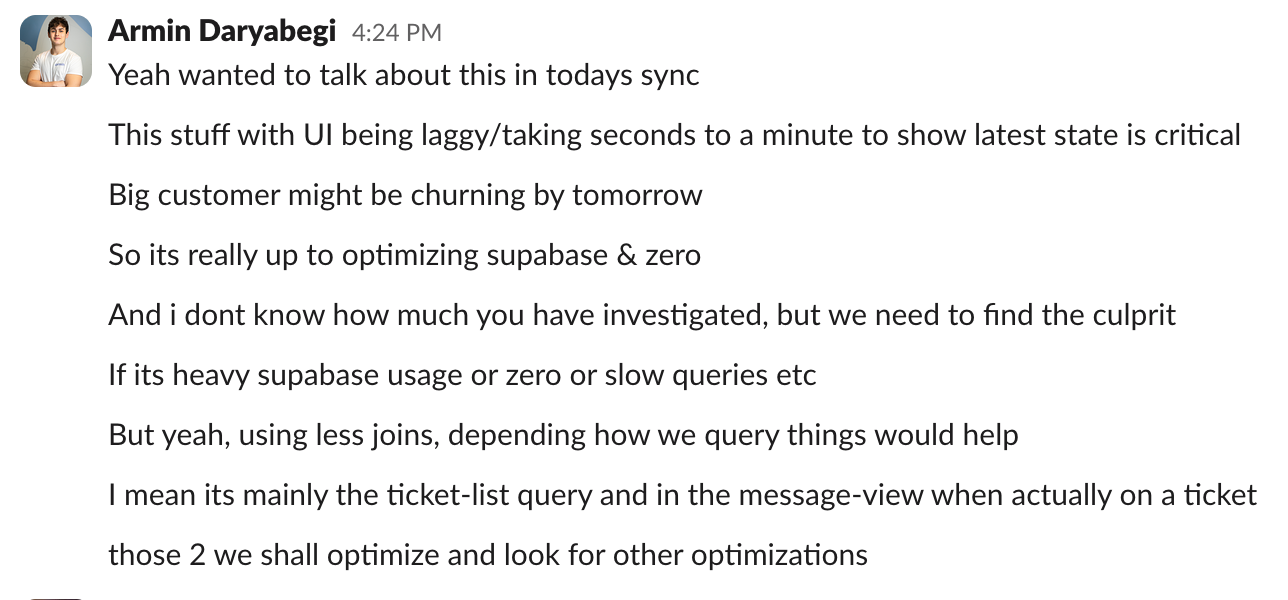
That was the point where it became clear that the problem was not one slow query. The problem was the architecture.
Caching Helped, But It Did Not Solve It
The first thing we tried was caching.
We put a cache in front of the view results and invalidated it when new tickets or relevant updates came in.
That helped for a while.
But the problem with an inbox is that the data is always changing. A ticketing system is not a static dashboard. New tickets come in, agents reply, statuses change, assignments change, tags change, unread state changes.
So the cache was constantly being invalidated.
And whenever the cache was invalidated, we were back to the same problem: recomputing the view from the source data.
Caching reduced some repeated work, but it did not change the fact that we were still doing too much work when users were trying to read from the inbox.
Why We Did Not Use Materialized Views
We also considered using database views or materialized views.
At first, that sounds like the obvious solution. If the query is expensive, precompute it and read from the precomputed result.
But for our case, it did not really work.
The inbox needs to feel close to real time. If a new ticket comes in, agents expect to see it quickly. If a ticket is assigned, resolved, or reopened, the counts should reflect that quickly as well.
With a materialized view, you still have to refresh it. If we refreshed it very often, we would still be putting heavy recomputation work on the database. If we refreshed it less often, the inbox would feel stale.
So materialized views did not remove the core problem. They only moved it somewhere else.

We needed another approach.
The Shift We Made
The main realization was simple:
CX has more reads than writes, so we should optimize for reads.
Agents keep the inbox open all day. They switch between views, refresh lists, check counts, paginate, and sort. Reads happen constantly.
Ticket changes are frequent too, but they are still a better place to do the work than making every agent pay the cost every time they open a view.
So we changed the model.
Instead of asking this every time someone reads:
Which tickets match this view right now?
We started asking this when a ticket changes:
Did this ticket enter, leave, or update inside any saved view?
That is the idea behind what we internally call view membership.
For the public explanation, I would describe it as a read-optimized inbox projection.
In simple terms, for each saved inbox view, we keep a compact list of the tickets that currently belong to it. We also store the small amount of metadata needed to sort, paginate, and update counts quickly.
So opening a view changed from:
Run the full filter across all tickets.
To:
Read the already-computed list for this view.
That one shift changed the whole performance profile.
How the New System Works
When something relevant changes, like a ticket, message, tag, assignment, or saved view filter, the change flows through our CDC pipeline. An event handler picks it up and queues work for the projection worker.
The worker then evaluates the ticket against saved inbox views and updates the projection.
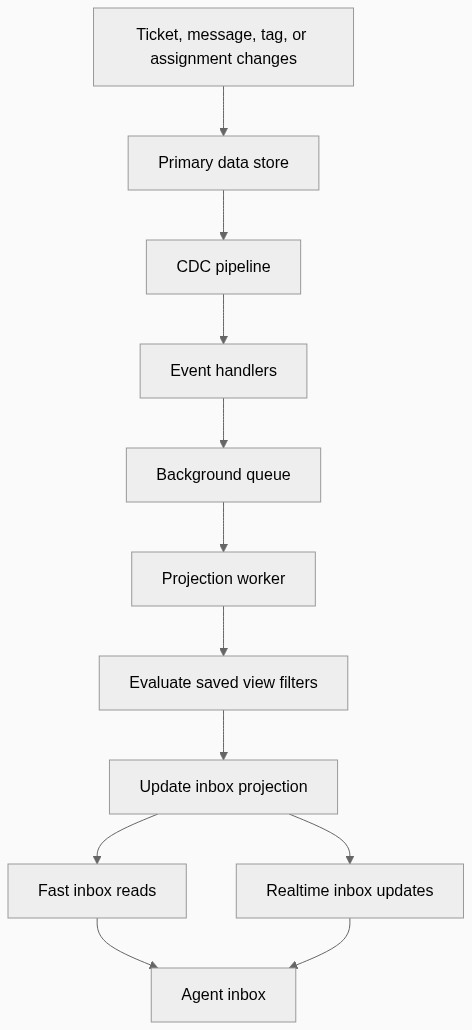
The important part is the diff.
When a ticket changes, we compare what the projection currently says with what the filters say now.
There are three possible outcomes:
- the ticket now matches a view it did not match before
- the ticket no longer matches a view it used to match
- the ticket still matches, but some metadata changed
That becomes an insert, delete, or update in the projection.
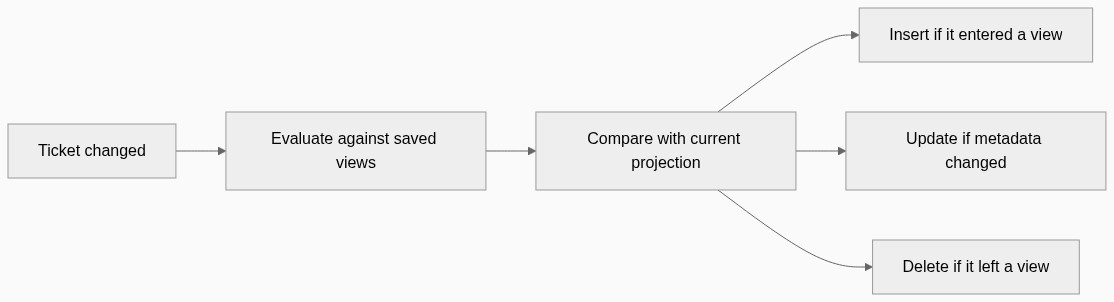
Now the read path is much cheaper. The inbox does not need to recompute the whole view on every request. It can read from the projection and paginate from there.
Handling View Changes
Normal ticket updates can be handled incrementally.
But changing the filters of a saved view is different. If the view definition changes, then many existing projection entries may be wrong.
For that case, we rebuild the projection for that view.
The rebuild scans tickets in batches, evaluates each ticket against the new filters, adds tickets that now match, removes tickets that no longer match, and recomputes counts.
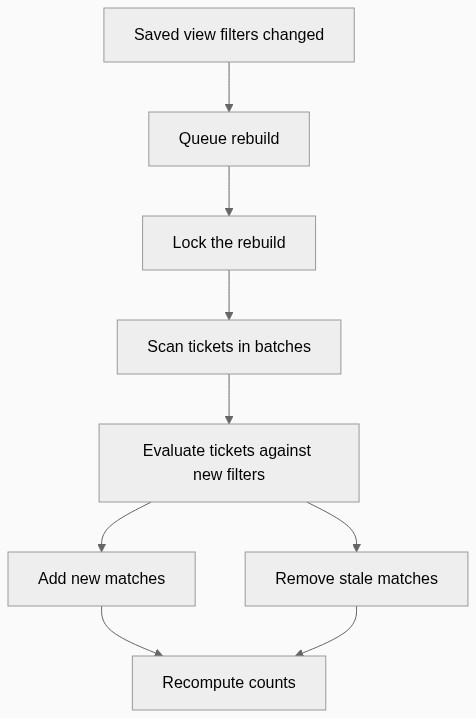
One important thing we had to handle was tickets changing while a rebuild is running.
If that happens, we do not want the rebuild and the ticket update fighting each other. So we coordinate around the rebuild. Ticket updates that happen during the rebuild are tracked and processed again after the rebuild finishes.
That keeps the system consistent without blocking the whole inbox.
Counts Became Incremental Too
Counts were another big part of this.
The old way of getting counts was basically to ask the database to count the filtered result. That becomes expensive when the dataset grows.
With the projection, counts can be updated based on the change that happened.
If a ticket enters a view, the count goes up. If it leaves, the count goes down. If it moves between buckets, like unassigned to assigned, we update those buckets.
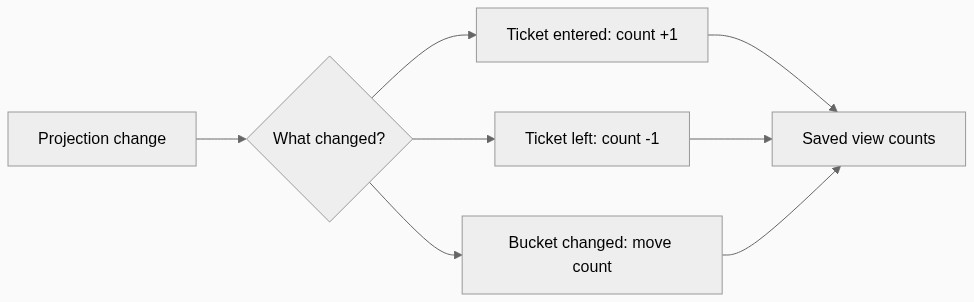
This means we avoid running expensive count queries every time agents need fresh view counts.
What This Changed
The biggest change is that inbox views no longer scale mainly with agent refreshes.
Before, the cost looked more like this:
number of agents x number of views x refresh frequency x query complexity
After the change, the cost moved closer to this:
ticket changes x affected views
That is a much better model for CX.
It gave us:
- faster inbox loading
- less database read pressure
- low-latency ticket list updates
- fresher counts
- better behavior when many agents are active
- a read path that stays simple even as ticket volume grows
The goal was not to chase a fancy benchmark. The goal was to make the inbox stay fast and reliable when customers were processing a lot of tickets.
The Tradeoff
This was not a free win.
We did not have to invent a completely new infrastructure stack, because CDC events, queues, workers, locks, and realtime delivery were already part of our system.
But we did have to move complexity into the rules around maintaining the projection.
We had to think about:
- which changes should trigger reevaluation
- how to avoid processing the same ticket too many times
- what happens when a saved view is rebuilt
- what happens when tickets change during that rebuild
- how to keep counts correct
- how much eventual consistency is acceptable for the user experience
The read path became simpler, but the update path became more responsible.
For CX, that tradeoff made sense. The inbox is read constantly by many agents. Making reads fast and predictable was more important than keeping the old query-driven model.
Why This Matters for CX
The inbox is the center of CX.
Routing, assignment, automation, collaboration, reporting, and customer context all depend on agents seeing the right work at the right time.
For small teams, a simple query-driven inbox can work. But commerce support does not stay small forever. During launches, campaigns, delivery issues, or seasonal peaks, ticket volume can spike quickly.
At that point, performance becomes part of the product.
We built this because high-volume support teams need an inbox that keeps up with them. They should not have to wait for views to load. They should not see stale counts. They should not feel the system slow down when the team is busiest.
The engineering should disappear into the experience.
Agents should not have to think about CDC, queues, projections, polling, or incremental updates. They should just open CX and see the right tickets, in the right place, at the right time.
That is the real lesson from this work:
When the inbox becomes mission-critical, performance is not an implementation detail. It is a product feature.
CX is built for teams that have outgrown basic shared inboxes and need support operations that can scale with their customer volume.